

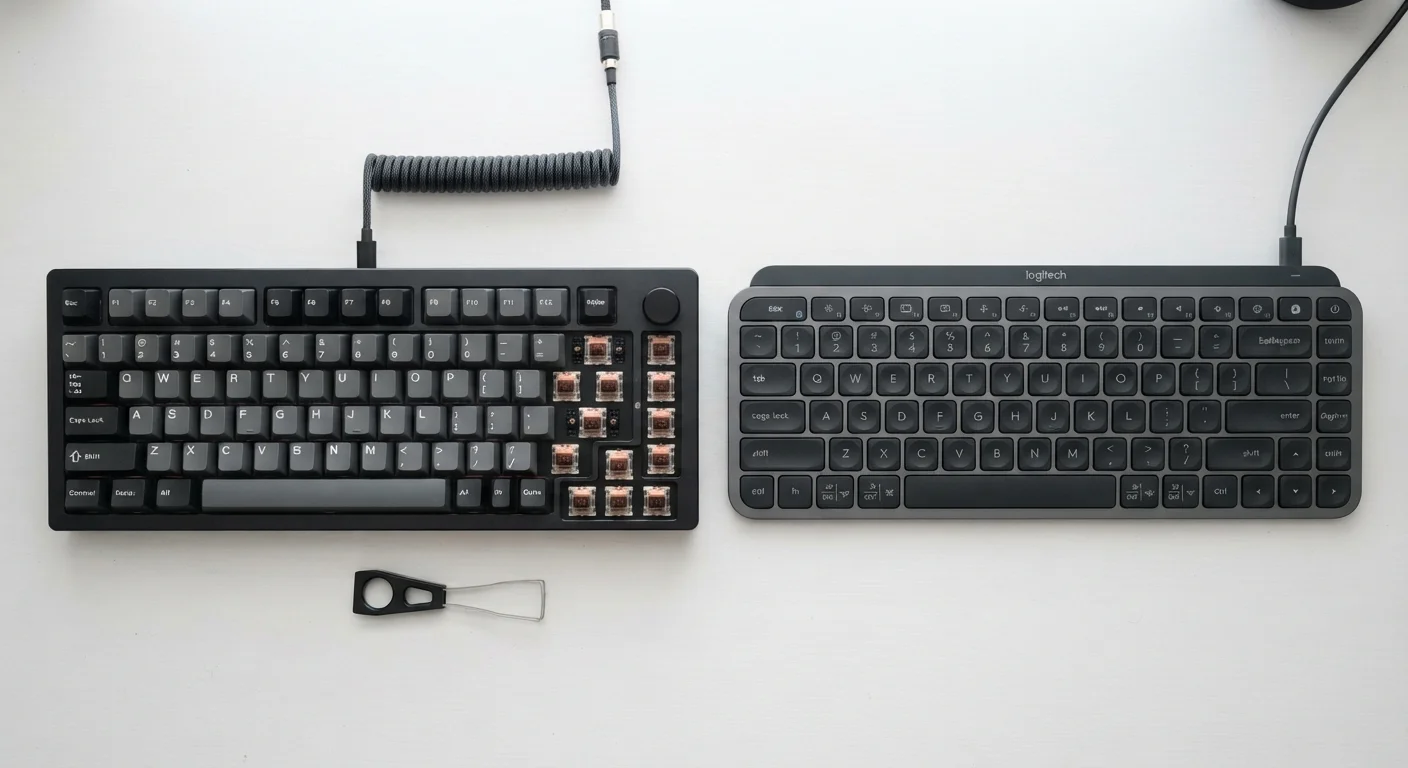
Key Takeaways
- Mechanical keyboards use individual switches per key; membrane keyboards use a pressure pad beneath a silicone layer.
- Mechanical switches offer distinctly different tactile and audible feedback depending on switch type.
- Membrane keyboards are generally quieter and significantly less expensive than mechanical alternatives.
- Mechanical keyboards typically last 50-100 million keystrokes per switch; membrane keyboards far fewer.
- Neither type is universally superior - the right choice depends on use case and personal preference.
Option A
Mechanical Keyboards
The tactile, durable, customizable choice.
Best for: Users who type heavily throughout the day and want precise, responsive feedback with long-term durability.
Option B
Membrane Keyboards
The quiet, affordable, widely available option.
Best for: Casual users and shared office environments where low noise, low cost, and compact design are top priorities.
If you type for extended periods daily and want physical feedback
Mechanical Keyboards
Individual switches reduce finger fatigue by giving clear actuation signals, so you don't need to bottom out every keystroke. The durability also means a longer lifespan for heavy use.
If you share a workspace or need minimal noise
Membrane Keyboards
Membrane keyboards produce significantly less sound during typing, making them far less disruptive in open-plan offices or shared living spaces.
If budget is your primary concern
Membrane Keyboards
Membrane keyboards are widely available at a fraction of the cost of most mechanical options, making them practical for basic computing needs.
If you want to customize your typing experience over time
Mechanical Keyboards
Most mechanical keyboards support keycap swapping and, on higher-end models, switch swapping - allowing you to fine-tune feel and sound to your preference.
The Core Technology: What's Actually Under the Keys
The most important difference between mechanical and membrane keyboards isn't how they sound - it's how each key physically registers a press.
In a membrane keyboard, all keys sit above a multi-layer pressure pad. When you press a key, it pushes through a top membrane layer onto a conductive bottom layer. That contact completes the circuit and registers the keystroke. The entire system shares one continuous layer, meaning individual keys aren't mechanically isolated from each other.
In a mechanical keyboard, every single key sits on top of its own dedicated switch - a small self-contained housing with a spring and metal contacts inside. Pressing the key moves a stem downward, actuating the switch at a specific point in its travel. Because each switch is independent, the registration happens at a defined, consistent point rather than when the key bottoms out completely.
This fundamental difference is why the two keyboard types feel so different to type on, even before you account for switch variety.
| Criterion | Mechanical Keyboards | Membrane Keyboards |
|---|---|---|
| Key registration method | Individual dedicated switches | Shared pressure-pad membrane |
| Tactile feedback | Distinct bump or click (switch-dependent) | Soft, mushy feel; no defined actuation point |
| Noise level | Moderate to loud (varies by switch) | Generally quiet |
| Typical lifespan | 50-100 million keystrokes per switch | Lower; no standardized per-key rating |
| Customizability | High - keycaps, switches replaceable | Low - limited modification options |
| Relative cost | Higher upfront investment | Lower cost; widely affordable |
| Weight and portability | Typically heavier and thicker | Lighter, often slimmer |
Switch Types: Why Mechanical Keyboards Aren't One-Size-Fits-All
One source of confusion for newcomers is that "mechanical keyboard" doesn't describe a single feel - it describes a technology category. The actual typing experience depends heavily on which type of switch is installed.
Switches are broadly categorized into three families:
- Linear switches move smoothly from top to bottom with no tactile bump and no audible click. They're consistent and quiet relative to other mechanical switches, and are popular in fast-paced typing or gaming contexts.
- Tactile switches produce a noticeable bump partway through the keystroke - physical feedback that tells your finger the key has registered without requiring a full press. No sharp click sound, but a definite physical sensation.
- Clicky switches combine a tactile bump with an audible click at the actuation point. These are satisfying for many typists but can be disruptive in shared environments.
Switch actuation force - how hard you need to press - also varies across and within these families, typically measured in grams. A switch requiring 45g of force feels noticeably lighter than one requiring 65g. This variation means two mechanical keyboards sitting side by side can feel quite different from each other.
50-100M
Keystrokes per mechanical switch
Most mechanical switch manufacturers publish per-switch keystroke ratings in this range, compared to membrane keyboards which lack equivalent standardized ratings.
3
Main mechanical switch families
Linear, tactile, and clicky switches each deliver a fundamentally different typing feel, making switch choice a key decision when selecting a mechanical keyboard.
Practical Trade-offs: Noise, Longevity, and Cost
Beyond feel, several practical factors separate these keyboard types in everyday use.
Noise
Membrane keyboards are generally quieter. The silicone layer absorbs impact, dampening sound. Mechanical keyboards - especially clicky varieties - can be significantly louder. Even linear or tactile mechanical switches tend to produce more sound than membrane counterparts, though the gap can be reduced with dampening modifications.
Durability
Mechanical switches are individually rated for tens of millions of keystrokes - commonly 50 to 100 million per switch depending on the manufacturer's specification. Membrane keyboards don't carry the same per-key ratings, and the shared pressure pad layer tends to degrade more noticeably over time, especially on heavily used keys like the spacebar and backspace.
Cost
Membrane keyboards are considerably less expensive, both to manufacture and to purchase. Entry-level mechanical keyboards typically cost more, and keyboards with premium build quality or hot-swappable switches (which allow switch replacement without soldering) sit at a higher price point still.
Once you have a keyboard you're comfortable with, learning keyboard shortcuts across Windows, Mac, and the web can meaningfully extend what you get out of it - whatever type you use.
Hybrid and 'Mecha-Membrane' Designs Exist
Some keyboards market themselves as hybrid or 'mecha-membrane' designs, combining elements of both technologies. These typically use membrane actuation with individual key stems designed to mimic mechanical feel. They occupy a middle ground in price and feel but are distinct from true mechanical keyboards with independent switches. If you're specifically seeking mechanical switch performance, verify the switch type before purchasing.