

Key Takeaways
- Apps integrate deeply with device hardware - cameras, GPS, and push notifications - while mobile websites cannot.
- Mobile websites require no installation and work across any device with a modern browser.
- Apps generally offer faster performance and offline functionality; mobile websites depend on a live connection.
- Each format requests different levels of data access, which has privacy implications worth understanding.
- The right choice depends on how often you use a service and what capabilities you need from it.
Option A
Native Mobile App
The deep-integrated, device-native experience.
Best for: Users who return to a service frequently and want seamless performance, offline access, or hardware integration.
Option B
Mobile Website
The frictionless, install-free alternative.
Best for: Users who need quick, occasional access without committing storage space or granting app-level permissions.
If you use a service daily and want the fastest, most feature-complete experience
Native Mobile App
Apps load faster, work offline, and tap into device hardware like the camera and location sensor in ways a browser cannot replicate.
If you need occasional, one-time access without installing anything
Mobile Website
A mobile website requires no download, no account setup for browsing, and leaves no persistent presence on your device.
If you want tighter control over what a service can access on your device
Mobile Website
Browsers sandbox websites from most device resources by default, giving you a narrower permission footprint than an installed app.
If you rely on a service in low-connectivity or offline situations
Native Mobile App
Many apps cache content and core functionality locally, letting you continue working even without an active internet connection.
What Actually Separates an App from a Mobile Website
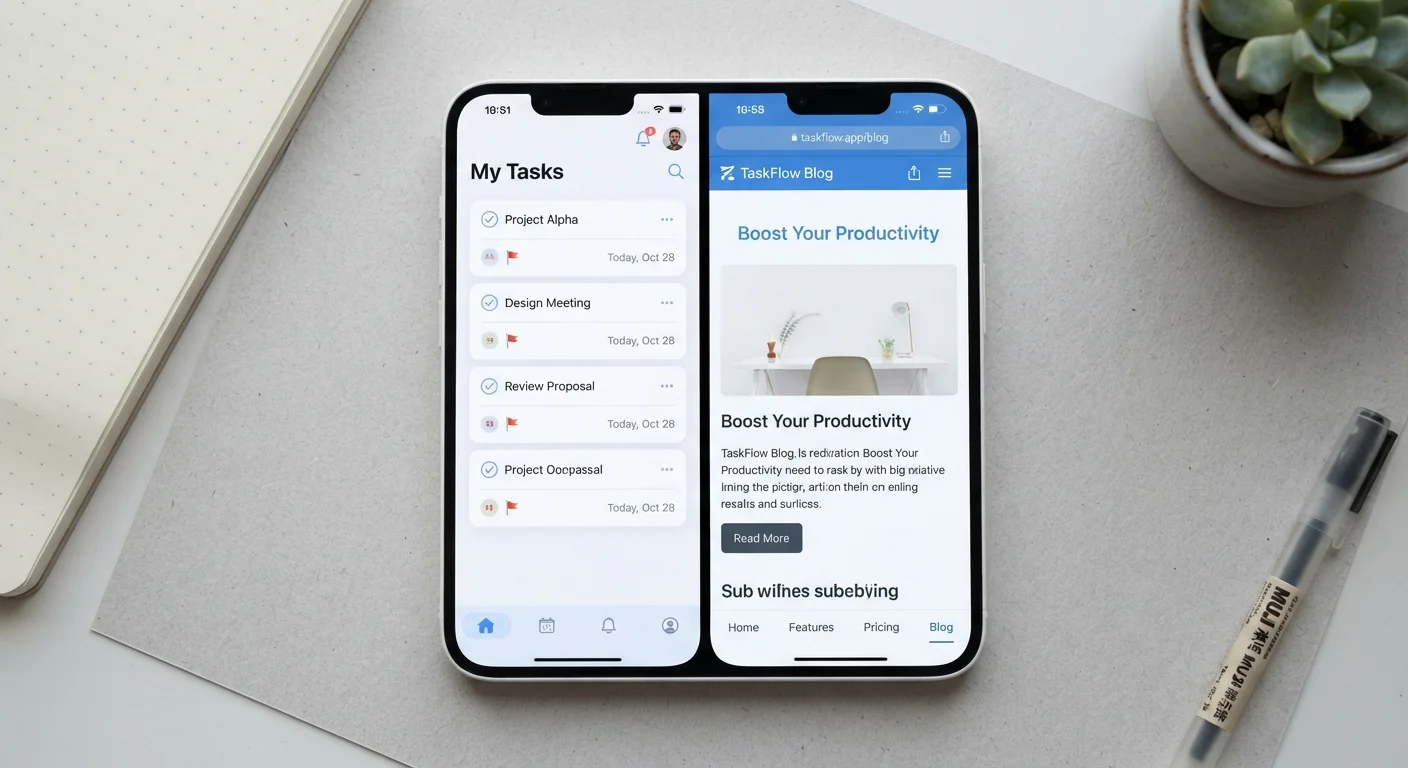
At a surface level, a native app and a mobile website can look nearly identical - same logo, same color scheme, same general layout. But the underlying architecture is fundamentally different, and that gap shapes everything from loading speed to what the service can do with your phone's hardware.
A native mobile app is software installed directly on your device. It runs using your phone's operating system and can request access to hardware components - the camera, microphone, GPS, accelerometer, local storage, and push notification system. An app can continue operating in the background and function without a live internet connection, depending on how it's built.
A mobile website is a webpage optimized for smaller screens, delivered through a browser like Chrome or Safari. It runs inside a sandboxed environment - meaning the browser deliberately limits what the page can access on your device. This is a deliberate security design: websites can't silently access your camera or contacts without an explicit, per-session browser permission prompt.
That architectural split is why the same airline, bank, or streaming service can feel genuinely faster or more capable in its app compared to its mobile website - even if the visual difference seems minor.
| Criterion | Native Mobile App | Mobile Website |
|---|---|---|
| Installation required | Yes - downloaded from app store | No - opens in any browser |
| Hardware access (camera, GPS) | Broad, persistent access | Limited, session-by-session only |
| Offline functionality | Often available | Generally not available |
| Performance speed | Typically faster | Dependent on browser and network |
| Background data collection | Possible when permitted | Not possible once tab is closed |
| Push notifications | Full support | Limited browser-based support |
| Storage use on device | Uses device storage | Minimal footprint |
Performance, Permissions, and Privacy
Performance is one area where apps hold a measurable structural advantage. Because an app's code runs natively on your device rather than being interpreted by a browser engine on the fly, many actions - navigation, image rendering, transitions - complete faster. Apps also pre-load assets during installation and can cache data locally, which reduces dependency on network speed.
Mobile websites have improved significantly with advances in browser technology and progressive web app (PWA) standards - a middle-ground format that allows some offline storage and home-screen shortcuts - but they still cannot match a fully native app for hardware integration or background processing.
~90%
Mobile time spent inside apps vs. browsers
Industry research from data analytics firms consistently finds that the large majority of smartphone usage time occurs within native apps rather than mobile browsers.
50-200 MB+
Typical app storage footprint
Native apps vary widely in size, but many common service apps occupy between 50 MB and several hundred megabytes of device storage, not counting cached data.
The permissions story cuts both ways. Apps can request broad, persistent access to device features: location even when the app is closed, contact lists, photo libraries. This enables genuinely useful features like automatic photo uploads or location-based alerts, but it also means more of your data is potentially accessible to the app developer on an ongoing basis.
Mobile websites operate with a narrower permission scope by default. Browser-mediated access requires active consent each session for most hardware features, and the website cannot persist in the background once you close the tab. For users who prefer a smaller data footprint, this is a meaningful distinction - particularly for services they use infrequently. The calculus isn't always obvious, which is also relevant when you consider decisions like shopping through a brand's app versus its website, where app-exclusive deals are often traded against expanded data access.
When Each Format Has a Genuine Edge
The right format depends almost entirely on your usage pattern and what you need the service to do.
Apps make the most sense when:
- You use the service regularly - daily or several times a week.
- You need features that rely on device hardware (a food delivery app tracking a driver's GPS, for instance, or a fitness app reading accelerometer data).
- You want offline access - note-taking apps, music players, and navigation tools are common examples.
- Push notifications add real value to how you use the service.
Mobile websites make the most sense when:
- You access the service occasionally and don't want to dedicate storage space or permissions to an installed app.
- You're on a borrowed or shared device.
- You want to avoid a service's background data collection.
- You're comparing multiple services quickly without committing to any one ecosystem.
It's also worth noting that the experience gap between the two formats varies significantly by service category. A streaming platform or mapping tool benefits enormously from native app architecture. A news site or informational service may offer nearly identical utility through a well-built mobile website. Understanding this distinction lets you make deliberate choices rather than defaulting to whichever format a service's marketing pushes you toward - a dynamic also worth considering in adjacent contexts like grocery delivery apps versus click-and-collect.
Progressive Web Apps: A Middle Ground
Progressive Web Apps (PWAs) are websites built with technologies that allow some app-like behaviors - including home-screen shortcuts, limited offline caching, and occasional push notifications - without requiring a full app store download. They represent a narrowing of the gap between the two formats, though they still cannot access the full range of device hardware that a native app can. Some services offer PWAs as a deliberate alternative to a full native app.