

Key Takeaways
- OLED pixels produce their own light; LCD pixels are illuminated by a separate backlight.
- OLED delivers true blacks and higher contrast ratios; LCD generally achieves higher peak brightness.
- LCD panels typically resist burn-in better and tend to last longer under static-image conditions.
- OLED consumes less power displaying dark content; LCD can be more efficient with bright, uniform images.
- Neither technology is universally superior - the right choice depends on your use case and environment.
Option A
OLED
The self-emissive, contrast-first display technology.
Best for: Viewers who prioritize deep blacks, rich contrast, and vivid color in controlled or dim lighting environments.
Option B
LCD
The proven, bright, and widely available backlit display.
Best for: Everyday users who need reliable brightness, longevity, and value across a range of lighting conditions.
If you watch a lot of movies and TV in a dark room
OLED
OLED's ability to turn individual pixels completely off produces true blacks and cinematic contrast that LCD backlights cannot replicate.
If your screen will be used in bright or sunlit environments
LCD
LCD panels - especially those with high-brightness LED backlights - maintain visibility in ambient light better than most OLED displays.
If you display static images or use a screen as a permanent dashboard
LCD
Static content over long periods raises the risk of burn-in on OLED panels; LCD technology is not susceptible to this issue.
If you value vivid color accuracy for photo or video editing
OLED
OLED's per-pixel light control produces exceptional color volume and accuracy, particularly in dark tonal ranges.
If you're weighing a budget-conscious purchase for general use
LCD
LCD remains the more widely available and cost-accessible technology, offering solid performance across a broad range of screen sizes and applications.
How Each Technology Produces an Image
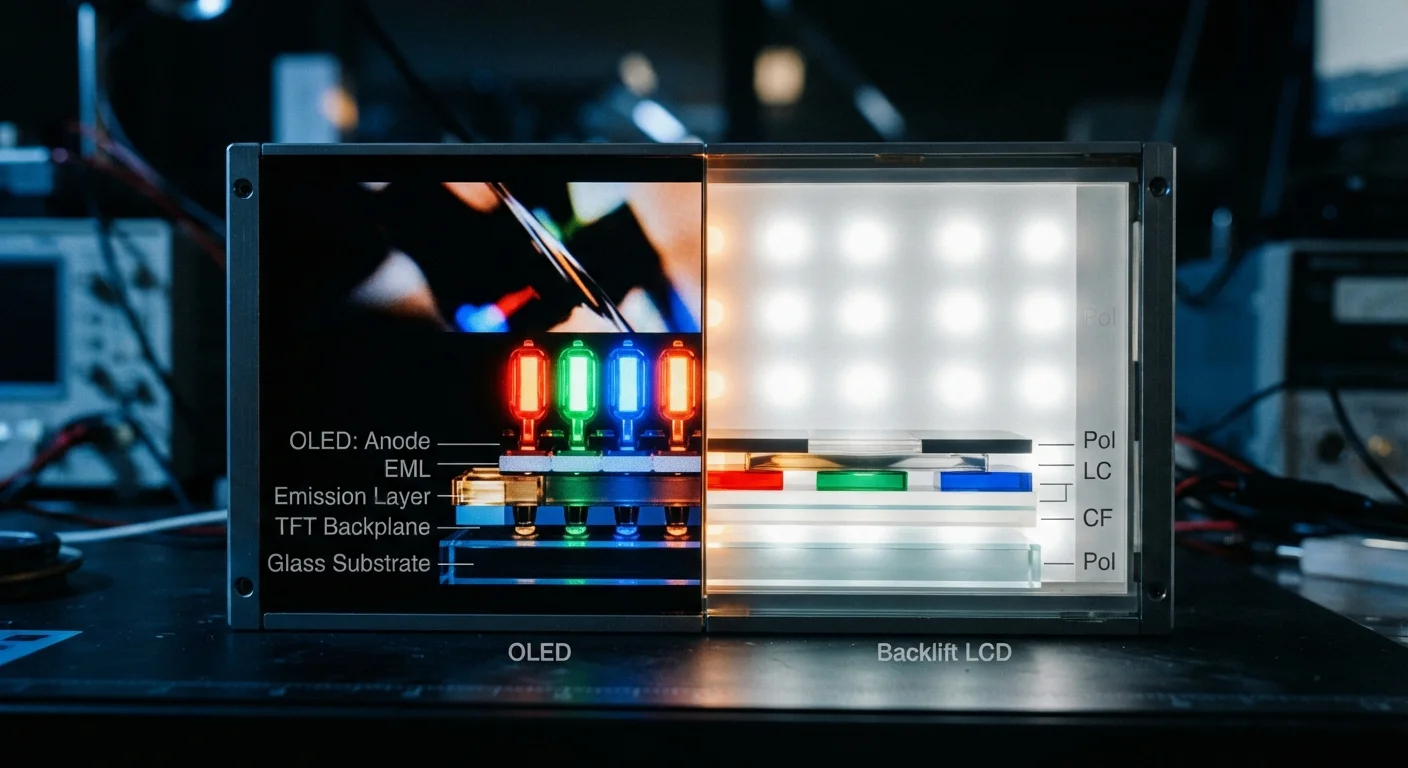
The fundamental difference between OLED and LCD comes down to how they generate light. LCD (Liquid Crystal Display) relies on a separate backlight - typically an array of LEDs - that shines through a layer of liquid crystals. Those crystals act as shutters, blocking or allowing light to pass through color filters to produce each pixel's color. Because the backlight is always on, even the darkest parts of an image have some residual glow.
OLED (Organic Light-Emitting Diode) takes a different approach entirely. Each individual pixel is its own light source, made from organic compounds that emit light when an electrical current passes through them. When a pixel needs to be black, it simply switches off - producing absolute darkness rather than a dimmed approximation.
This structural difference is the root cause of nearly every practical distinction between the two technologies, from contrast ratios to power consumption.
| Criterion | OLED | LCD |
|---|---|---|
| Light source | Each pixel self-emits | Shared LED backlight |
| Black level | True black (pixel off) | Dark gray (backlight bleeds) |
| Contrast ratio | Effectively infinite | High, but backlight-limited |
| Peak brightness | Moderate to high | Very high (especially mini-LED) |
| Burn-in risk | Present with static images | Not applicable |
| Power efficiency | Better with dark content | More consistent across content |
| Color accuracy | Excellent, especially dark tones | Good with wide-gamut filters |
| Typical availability | Premium segments | Broad range of price points |
Contrast, Brightness, and Color: Where Each Excels
OLED's per-pixel control gives it a decisive advantage in contrast ratio. Because black pixels emit no light at all, OLED screens can achieve contrast ratios that are effectively infinite - a measurement LCD panels cannot match with a shared backlight. This makes OLED particularly well-suited to dark scenes in film, HDR content, and gaming environments where shadow detail matters. For more on how these qualities interact with streaming quality labels, see what HDR and Dolby Vision mean in practice.
LCD, however, has the edge in raw peak brightness. Modern LCD panels - especially those using mini-LED backlighting with local dimming zones - can push significantly higher nit counts than most OLED displays. In sunny rooms or outdoor settings, that brightness advantage matters more than deep blacks.
Color performance is strong on both technologies, but OLED tends to produce more accurate hues in darker tones because each pixel's output is independently controlled. LCD panels with wide color gamut filters can be competitive, but backlighting uniformity remains a limiting factor.
~1,000,000:1
Typical OLED contrast ratio
OLED panels routinely achieve contrast ratios exceeding one million to one due to true per-pixel black levels, compared to the 1,000-5,000:1 typical of standard LCD panels.
2,000+ nits
Peak brightness of high-end LCD
Mini-LED LCD displays in the premium tier can sustain peak brightness levels that most current OLED panels do not match, an advantage in bright ambient environments.
~15-20%
Estimated OLED power savings with dark UI
Industry testing has indicated that dark-mode interfaces on OLED smartphones can reduce display power consumption by roughly 15-20% compared to light-mode equivalents, though results vary by panel and content.
Longevity, Burn-In, and Real-World Durability
One of the most common concerns raised about OLED is burn-in - a phenomenon where static elements like channel logos, navigation bars, or game HUDs gradually leave a faint, permanent impression on the panel. This occurs because the organic compounds in OLED pixels degrade at different rates depending on how much they're used. Pixels displaying bright static content age faster than those showing varied content.
Modern OLED panels have improved significantly with pixel-shifting and brightness management techniques designed to slow this process. Under typical mixed-use viewing, burn-in is far less common than early OLED's reputation suggests. That said, it remains a legitimate consideration for commercial signage, kiosks, or any setup where a fixed image displays for extended periods.
LCD panels do not suffer from burn-in and generally maintain more consistent output over their operational lifespan. The backlight can dim over time, but this typically happens gradually and uniformly rather than in visible patterns.
Mini-LED LCD: Closing the Gap
A newer category of LCD - mini-LED - uses thousands of smaller, individually controlled backlight zones to approximate OLED's contrast advantage. While it doesn't achieve true per-pixel control, mini-LED LCD narrows the gap substantially in dark-scene performance while maintaining LCD's brightness and burn-in advantages. It represents an important middle ground for consumers evaluating display technology.
Power Consumption and Practical Considerations
Power draw depends heavily on what's being displayed. OLED consumes very little energy when showing dark content - those pixels are off - but approaches or exceeds LCD power consumption when displaying bright, white-heavy screens. LCD power draw is more consistent regardless of image content because the backlight runs continuously.
For smartphones and laptops, where dark-mode interfaces have become standard, OLED's efficiency advantage is tangible. For monitors used primarily with document editing or spreadsheets - predominantly bright, light-colored interfaces - the efficiency gap narrows considerably.
Display technology choice also intersects with how screens affect users beyond image quality. If you use screens heavily in the evening, the characteristics of your panel - including brightness levels and the spectral quality of emitted light - may be worth understanding alongside your viewing habits. Screen time and sleep research offers relevant context here.
If you're also weighing how OLED and LCD compare to entirely different display approaches, E-Ink vs. LCD examines how reflective displays stack up for reading-focused use. And for a fuller picture of what screen specifications actually mean in use, screen resolution terminology explained is a useful companion.